Our wireless usb adapter aslo can be switch to AP mode .
When your home or office without wireless router ,only a wired internet .So your Mobile ,other computer or Iphone or Ipad want to couldnot share the interest ,at this moment , we can used our usb adapter switch to be AP Mode .let other machines to share the interest .
1.After installing the Driver ,then insert the wireless usb adapter with your computer (the application program usually will open and show the icon automatically in your screen.If you couldnot see the icon ,pls click beginning →program→REALTEK RTL8187 Wireless Lan Driver and Utility→REALTEK RTL8187 Wireless Lan Utility ,to open the wirless adapter driver management application program.) automatically in your screen.If you couldnot see the icon ,pls click beginning →program→REALTEK RTL8187 Wireless Lan Driver and Utility→REALTEK RTL8187 Wireless Lan Utility ,to open the wirless adapter driver management application program.)
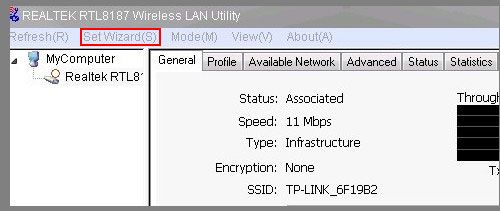
2.Then you will see the following pictures ,Click the 
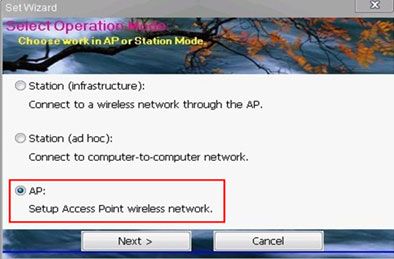
3.Choose the AP mode ,click Next :
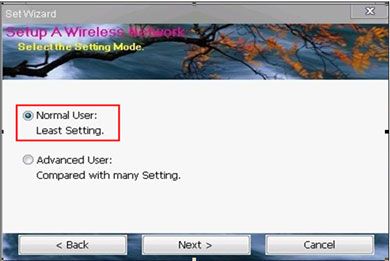
4.Choose Normal User ,click Next :
5.You can choose not change the enrryption ,then no password ,your internet is open .However ,you also can change the encryption , (for example, to AES) ,Click Next :
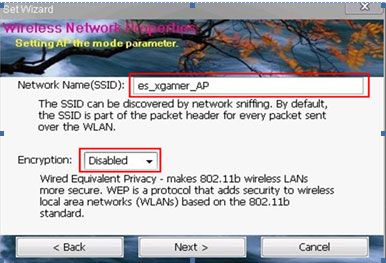
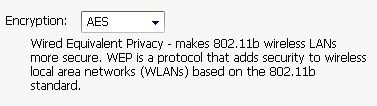
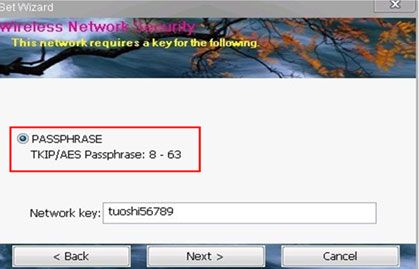
6.Write the password which you want ,try to remember this password ,because you will need to write the password when you make the mobile connect the WIFI .
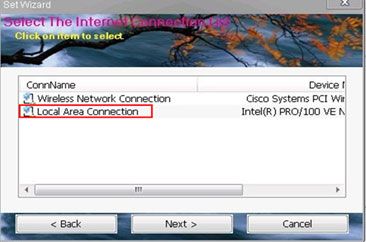
7.Choose the local Area Connection ,then Click Next :
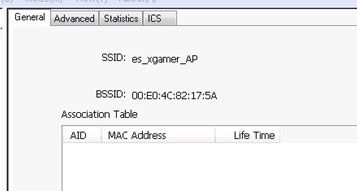
8.Then SSID es_xgamer-AP is your wifi SSID ,you used your mobile or other laptop to connect this wifi ,to share the internet
|